KPI Details
KPI Details  in KPI View displays all the defined settings for the KPI.
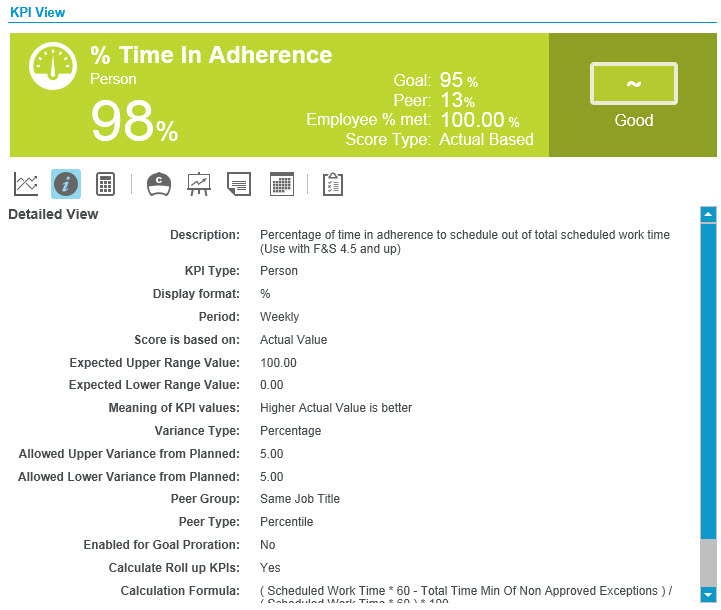
|
Field |
Description |
|---|---|
|
Description |
Explanation of the purpose of this KPI. Example: Number of calls answered in selected week. |
|
KPI Type |
Lists the scope of the KPI (Person or Organization) Example: Organization |
|
Display format |
How the KPI is shown Example: % Note: If you select the Time format, the units of the formula must be in seconds. |
|
Period |
The periodicity of the KPI (Intraday, Daily, Weekly, Monthly, Quarterly, Annually). Example: Daily |
|
Score is based on |
Lists the score calculation based on the Actual Value or Peer Value. Example: Actual Value |
|
Expected Upper Range Value |
Highest score usually attained Example: 1000 |
|
Expected Lower Range Value |
Lowest score usually attained Example: 50 |
|
Meaning of KPI values |
Shows the direction of “good” scores. If the variance is set to Up, higher scores are better. If the variance is set to Down, then lower scores are better. Example: Lower Actual values are better |
|
Variance Type |
Whether the variance is based on a percentage or a value Example: Value |
|
Allowed Upper Variance from Planned |
Sets the upper tolerance on the measurement range (used in determining your score) Example: 80.0% |
|
Allowed Lower Variance form Planned |
Sets the lower tolerance on the measurement range (used in determining your score) Example: 10.0% |
|
Peer Group |
Shows the peer group for this KPI. Example: All Orgs, Same Job Title, Same Goal |
|
Peer Type |
The type of value shown for the Peer Group Example: Percentile, Rank, Median, Mode, Mean, None. |
|
Enabled for Goal Proration |
Goal prorations occur when goal reductions, resulting from a change in number of days within a period, are configured for the KPI Example: Yes |
|
Calculate Roll up KPIs |
Whether this KPI is a roll-up KPI Example: Yes. |
|
Calculate Formula |
Displays the formula that is used to make the measurements for this KPI Example: Total Case Resolution Time / Total Cases In Risk Management, use cases to group interactionss according to the needs of the enterprise. Interactions can reside in multiple cases simultaneously. |
|
Job Titles excluded from Aggregation |
Indicates whether specific job titles are excluded from aggregation. Example: Supervisor, Agent, and so on. |
|
Set meeting goal as average score |
Indicates whether the system is set up to categorize meeting goal as Average.
|